Using Publication Labels to Distinguish Originals, Adaptations, and Licensed Translations
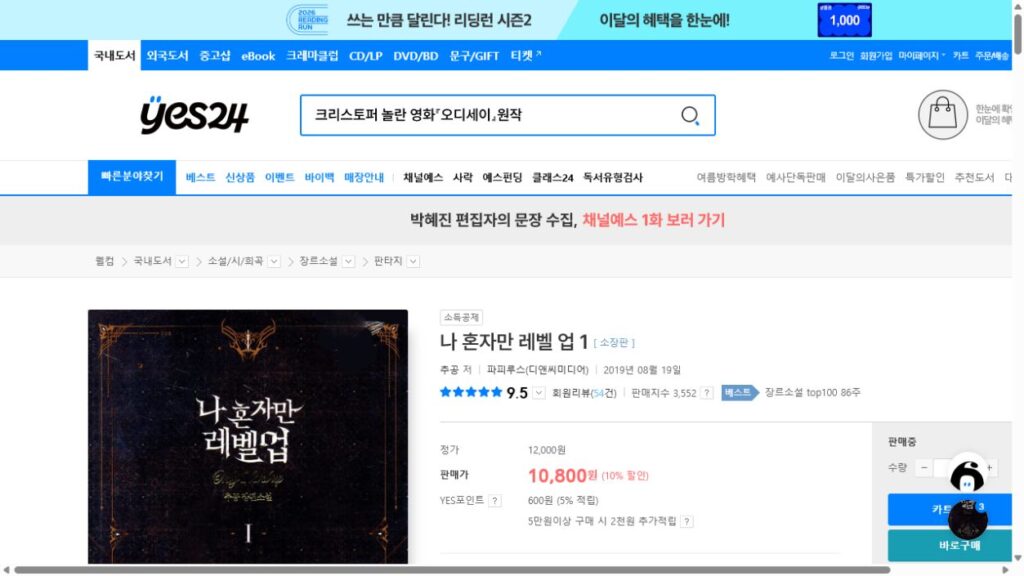
Shopping for books online in Korea on major platforms like Kyobo Book Centre (교보문고), YES24 (예스24), or Aladin (알라딘) offers access to a massive selection. However, navigating product listings can easily lead to purchasing errors. Cover artwork can be deceiving, frequently making a printed webtoon graphic novel look identical to its original web novel source text.
Similarly, foreign light novels and manga translated into Korean often share the exact same cover illustrations as their original releases. If you do not read the publication metadata carefully, you might accidentally buy a comic adaptation when you intended to read the full text novel, or purchase a fan spin-off instead of an officially licensed edition.
This guide shows you how to decode publisher imprint lines, read credit roles, and audit product detail pages on Korean online bookstores to ensure you order the exact format you want.
1. How to identify officially licensed foreign translations
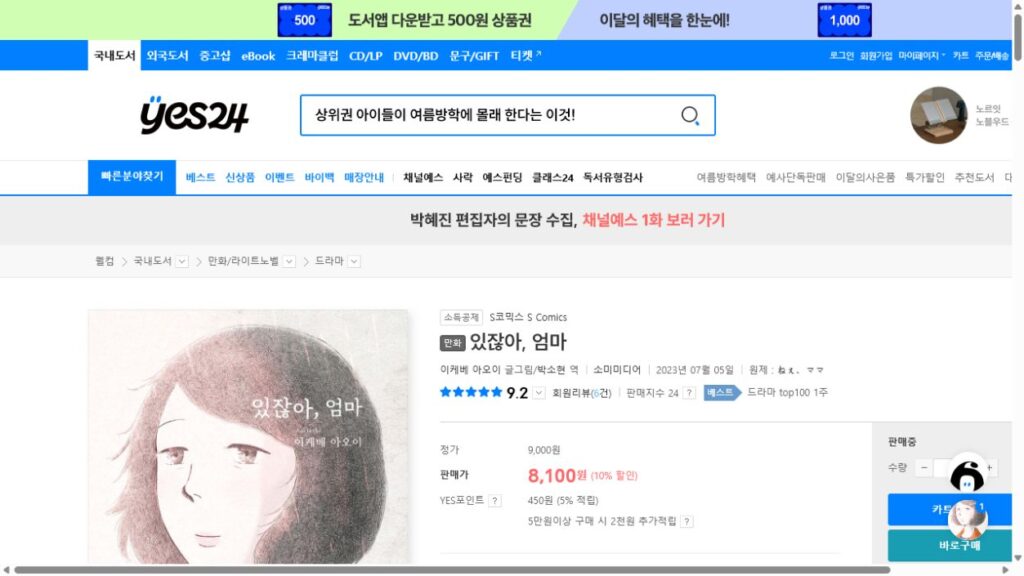
When purchasing translated Japanese light novels, Western fantasy books, or foreign comics in Korea, confirming that you are buying an officially licensed edition (정발본 / 정식 번역판) protects you from low-quality unauthorized reproductions.
Translator credit lines (역자 / 옮긴이)
The single fastest indicator of a licensed translation is the presence of a translator credit line. On Korean bookstore listings, look for the terms 역자 or 옮긴이 (Translator) placed directly beside or below the primary author’s name. An original domestic work will never feature a translator credit.
Dual-publisher copyright lines and licensing statements
Flip to the copyright page (usually located at the very back of the book). An officially licensed translation will display a dual copyright notice (©) crediting both the original foreign publishing house and the Korean publisher.
Look for formal arrangement phrasing such as:
Published by arrangement with [Foreign Publisher Name], Tokyo through [Agent Name], Seoul.
Seeing this statement confirms that the local Korean publisher legally licensed the translation rights from the original copyright holder.
2. Spotting webtoon adaptations of web novels and games
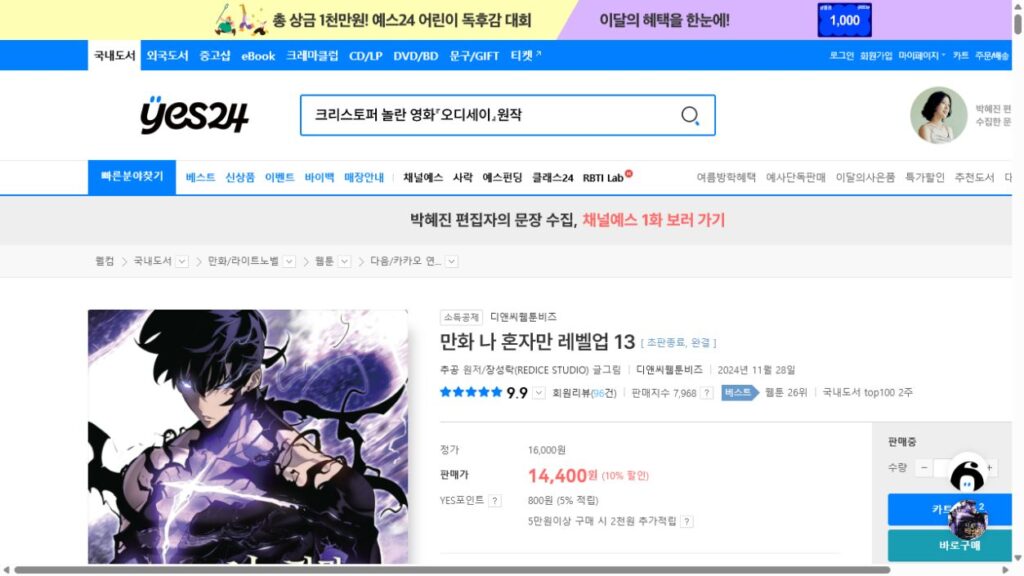
Korea’s media ecosystem frequently adapts popular web novels into webtoons—a publishing phenomenon known as “Noble Comics” (노블콤믹스). These webtoons are eventually printed as physical graphic novels, making them easy to confuse with the original text novel.
Reading original author and script adapter credits
When a web novel is adapted into a comic format, the front cover and product detail page will split the author credit into multiple roles. Pay close attention to these three Korean credit labels:
- Original Author (원작): The novelist who wrote the original text story.
- Script Adapter (각색): The writer who converted the novel text into a webtoon script.
- Art (그림): The illustrator who drew the webtoon panels.
If a book listing credits an original author (원작) alongside a separate artist (그림) or adapter (각색), you are looking at a graphic novel adaptation, not the original text novel.
Checking cover and spine labels for adapted series
Publishers usually print subtle format indicators on the book spine, front cover corner, or back cover blurb. Look for Korean subtitles such as “The Comic Edition” (만화판), “Webtoon Volume” (웹툰판), or “Graphic Novel Edition.” If these labels appear, the book contains comic panels rather than written prose.
Publication label cheat sheet: Original vs adaptation vs licensed translation
Use this quick reference cheat sheet to distinguish between book formats in 3 seconds:
| Book type | Front cover credits | Copyright page notice | Publisher imprint line |
| Original work | Single Author (or Author + Illustrator) | Single © Copyright holder | Single local publisher name |
| Media adaptation (Noble Comics) | Original Author (원작) + Adapter (각색) + Artist (그림) | Credits original author + comic artist | Lists adapting publisher (may reference original owner) |
| Licensed translation (정발본) | Original Author + Translator (역자 / 옮긴이) | Dual © (Original publisher + Local publisher) | “Published by arrangement with [Foreign Publisher]” |
Checking the credit line structure against this cheat sheet ensures you never mistake a comic adaptation for a text novel.
How to audit book details on Kyobo Book Centre and YES24 before buying
Before adding a book to your cart on Kyobo Book Centre (교보문고), YES24 (예스24), or Aladin (알라딘), perform this simple 3-step audit on the product page.
Check the author and translator tags
Look at the text line directly beneath the main title on the product page. Verify whether the tags say 역자 (Translator), 원작 (Original Author), or 각색 (Adapter). If you want the original text novel, ensure there is no 각색 (Adapter) or 그림 (Artist) tag listed.
Inspect the publisher info box
Examine the publisher name. Major Korean webtoon and light novel adaptations are published under specialized imprints such as D&C Media, Young Com, or Haksan Publishing. Knowing the imprint helps you identify whether the publisher specializes in graphic comics or prose literature.
Verify the original title field (원제)
Scroll down to the detailed book specification table. For licensed translations, Korean bookstores include a field labeled 원제 (Original Title), which lists the book’s title in its original language (such as Japanese, English, or French). The presence of an original title field confirms that the book is a translated foreign work.